覆盖模板方法及修改主题建议方法
覆盖模板方法
举例说明:
在block上放置一个title=“menu title link”的menu。
drupal core contrib theme生成的hook suggestions如下图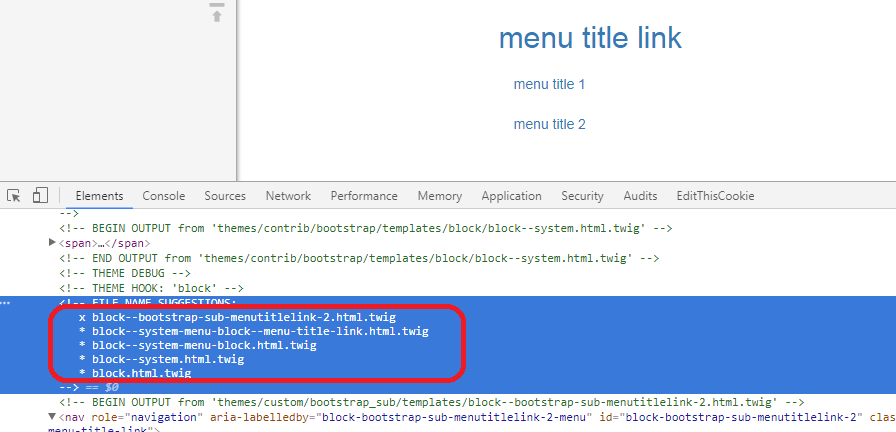
drupal会按照上图中建议顺序在自定义主题模板目录下查找并使用对应的文件
自定义主题目录:docroot\themes\custom\bootstrap_sub\templates
修改主题建议方法
覆盖模板方法不会经常使用,更经常用到的方法是修改Theme hook suggestions。
比如:node有两个bundle,一个是basic,一个是article,想让basic使用默认的node.html.twig,而想让article使用article.html.twig
这种情况可以使用以下3个hook方法来实现
hook_theme_suggestions_HOOK
hook_theme_suggestions_alter
hook_theme_suggestions_HOOK_alter
hook可以是module名也可以是theme名
HOOK可以是toolbar,page,region,block,node等
共用5个类hook可用,调用顺序如下:
后面会覆盖前边
尽量使用下边的hook来生成HOOK SUGGESTION
在变量传到模板前修改变量
hook按以下顺序执行
- template_preprocess(&$variables, $hook)
- template_preprocess_HOOK(&$variables)
- MODULE_preprocess(&$variables, $hook)
- MODULE_preprocess_HOOK(&$variables)
- ENGINE_engine_preprocess(&$variables, $hook)
- ENGINE_engine_preprocess_HOOK(&$variables)
- THEME_preprocess(&$variables, $hook)
- THEME_preprocess_HOOK(&$variables)123456/*** Implements hook_preprocess_HOOK() for my-template.html.twig.*/function test_twig_preprocess_my_template(&$variables) {$variables['test_var'] = 'Test Value changed by hook_preprocess_HOOK';}
模板有哪些变量?
修改主题样式
修改属性
Using attributes in templates
Modifying attributes in a .theme file
取得theme setting的值
取得admin/appearance/settings/themeName中的值
在node.html.twig中使用取得的值
Creating advanced theme settings